



FAQ
I want to borrow a book, but I forgot my student ID (library card).
You cannot borrow books without your student ID card or library card.
Please understand that this policy is in place to prevent actions such as attempting to borrow books under someone else's name.
The item status is not "Checked Out," but I cannot find the book, or I cannot find the journal issue even though it should be in the collection.
The following possibilities may explain why you cannot find it. Please consult the staff at the counter.
・The book is being used by someone else in the library.
・The book is in the New Arrivals section.
・The book is large and is shelved on the bottom shelf.
・The book has just been returned and is currently being processed.
・The book is being bound.
・The person who used the book did not return it to its original location.
Floor Guide.
Please refer to the "Library Map" on the library website.
About the maximum number of items that can be borrowed.
Please refer to the "Library Services Guide" under the "Library Usage Guide" section on the library website.
About returning items outside of library hours.
There is a book return drop box, so please return the items there. Please refer to the "Library Services Guide" under the "Library Usage Guide" section on the library website.
How to borrow and return books.
■ Borrowing
・You can check out materials at the counter of each campus library.
・You can also check out materials using the "Ufinity" smartphone app.
・Self-checkout machines are available (Minatomirai Campus only).
■ Returning
・You can return materials at the counter of each campus library.
・Except for some items, return drop boxes are also available (Yokohama Campus: during library closures only; Minatomirai Campus: while the campus is open).
For more details, please check the library guide.
About the mobile version of the OPAC.
The URL for the mobile OPAC (for smartphones) is as follows:
http://opac.kanagawa-u.ac.jp/webopac/mobtopmnu.do
There is also a dedicated application for the OPAC screen (for smartphones).
Can I use computers and printers inside the library?
Yes, you can use it. Please refer to the "Library Usage Guide" on the library website.
About back issues of journals.
Back issues of journals are mainly kept in the stacks. Please refer to the "Library Usage Guide" on the library website.
Types of journals.
There are many types of journals available in the library.
Academic Journals: Journals containing research papers written by scholars.
Bulletins (Kiyo): Periodic publications issued by universities, research institutes, etc.
General Magazines: Magazines covering hobbies, news, information, etc.
Newspapers: Domestic, international, and specialized news publications.
Electronic Journals: Digitized journals.
When are library orientation sessions held?
Please check the schedule for "Seminars and Guidance" on the library website.
What is a repository?
A repository (institutional repository) is a system that systematically collects and stores electronic intellectual products generated within an institution (such as academic journal articles, theses and dissertations, research reports for KAKENHI grants, lecture materials, teaching materials, and conference presentation materials) on the institution's server and makes them widely available on the Web.
What is "Article Search"?
You can search for domestic academic papers.
When you only know part of the title of the material.
[Book Search] tab, if you enter part of a keyword, a list of candidate materials starting with the entered string will be displayed (Suggestion function).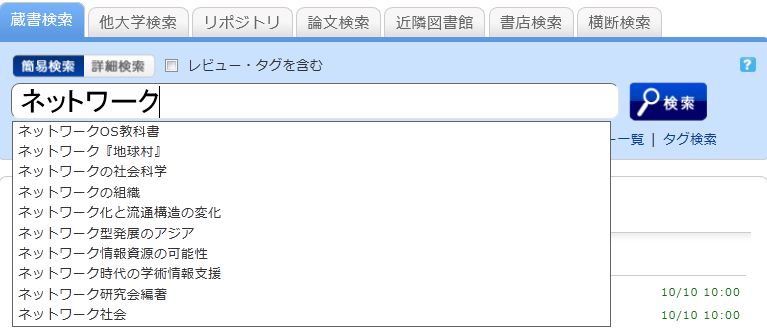
Select one from the displayed candidates and click the [Search] button to start the search.