



FAQ
OPAC is malfunctioning. (OPAC recommended browsers and guidelines)
Recommended Browsers
To ensure optimal use of the OPAC, we recommend using the latest version of the following browsers:
Windows
- Microsoft Edge
- Mozilla Firefox
- Google Chrome
Macintosh
- Safari
Note
The system may not function correctly if the following settings are enabled. If this applies to you, please adjust your settings accordingly.
- If cookies are disabled
What can I search for in the OPAC?
The OPAC has tabs corresponding to different search targets. Each tab is for:
・Bib Search: Books and journals held by this library
・Articles: Accessible domestic academic articles, etc.
・Other Univ.: Books and journals held by university libraries across the country
・Cross-Search: Materials held by the National Diet Library, public libraries, etc.
Please tell me how to use each database, how to search for materials, and how to make the most of the library.
Please refer to the page below:
How to Find Materials (Library Website)
I am looking for a specific item called "○○". What should I do first?
1.If the material you are looking for is a book:
You can search for it using the Library Catalog. Please perform your search using the [Book Search] tab.
If you cannot find the material in the Library Catalog, it is possible to request it from another university library. You can look for materials held by other universities using the [Other University Search] tab or the [Cross-Search] tab.
In the [Cross-Search] tab, you can search the collections of regional libraries and the National Diet Library. The National Diet Library makes efforts to archive every book published within Japan.
2.If the material you are looking for is a journal:
The basic procedure is the same as for books.
However, in the case of journals, there are physical copies (printed volumes) held in the library, and electronic journals (e-journals) that can be accessed via computer through contracts with publishers and other providers. If you are looking for e-journals, it is convenient to use the [Articles] tab.
3.If the material you are looking for is an academic article:
Please perform your search using the [Articles] tab.
How can I search using ISBN or ISSN numbers?
You can search by entering only the ISBN or ISSN number into the search box on the [Library Catalog] tab.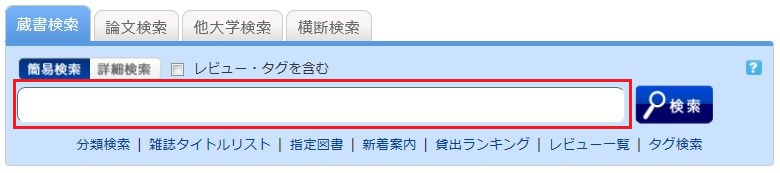
Alternatively, you can search from the advanced search screen by clicking the [Advanced Search] button on the [Library Catalog] tab.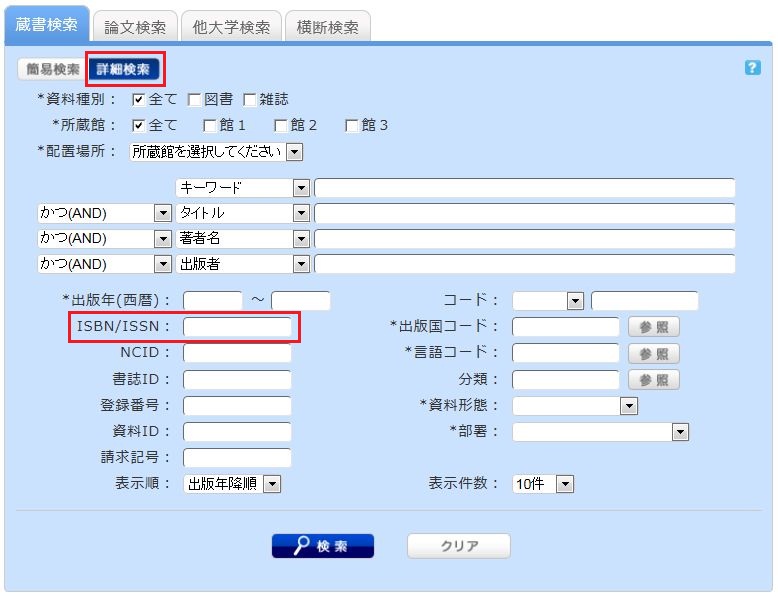
You can perform a search by entering the information in the ISBN / ISSN field.
ISBN (International Standard Book Number): A number used to identify books.
ISSN (International Standard Serial Number): A number used to identify journals/serials.