FAQ
FAQ
How can I search for reviews and tags?
Category:
1.1.How to search for library holdings
You can search the titles and full text of reviews and tags using the following five methods:
- Refer to "Recent Tags"
 or "New Reviews"
  on the top page.
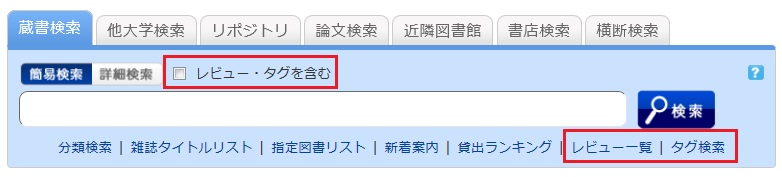
- Select "Review List" or "Tag Search" located below the search box on the [Library Catalog] tab.
- On the [Basic Search] screen of the [Library Catalog] tab, check the "Include Reviews/Tags" box and perform a search.
- On the [Advanced Search] screen of the [Library Catalog] tab, select "Review" or "Tag" from the pull-down menu for the search items.
(Compared to a basic search, this allows you to search using multiple conditions.)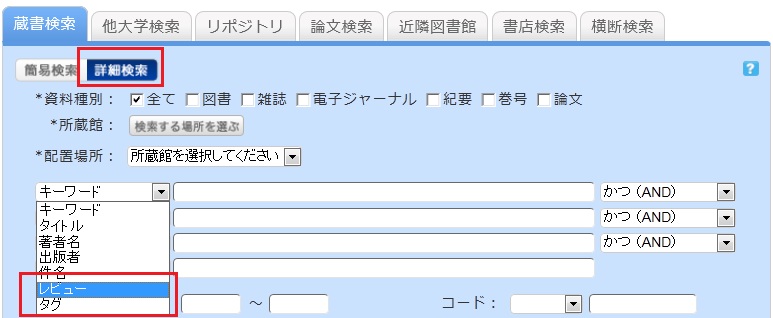
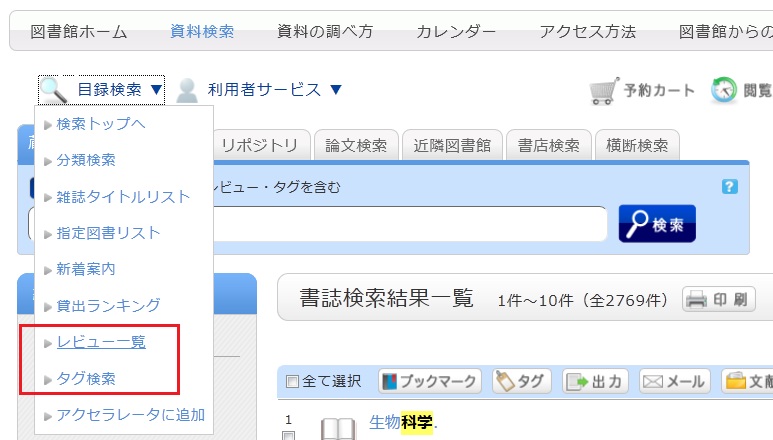
- Select "Review List" or "Tag Search" from the catalog search menu.