



FAQ
FAQ
Can I be notified when new books related to "○○" arrive?
The OPAC offers a service called Alert.
This feature remembers your search criteria and notifies you via email, RSS, or other methods when materials matching those criteria are newly acquired.
You can register by clicking "Save Search Criteria" after performing a search in the OPAC library catalog.
Alternatively, you can also register from the "Alert" section of the OPAC.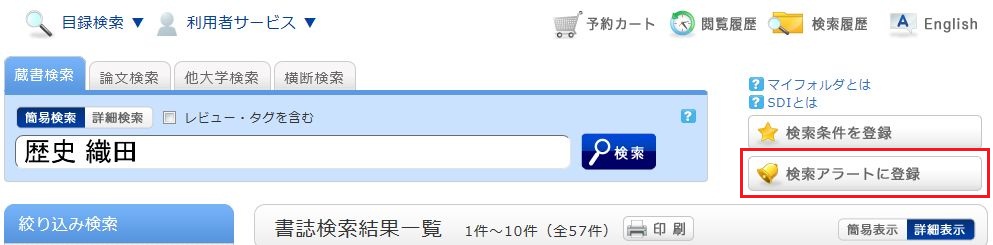
Once registered, your alert list screen will be displayed.
From here, you can view your active delivery list and change the delivery frequency.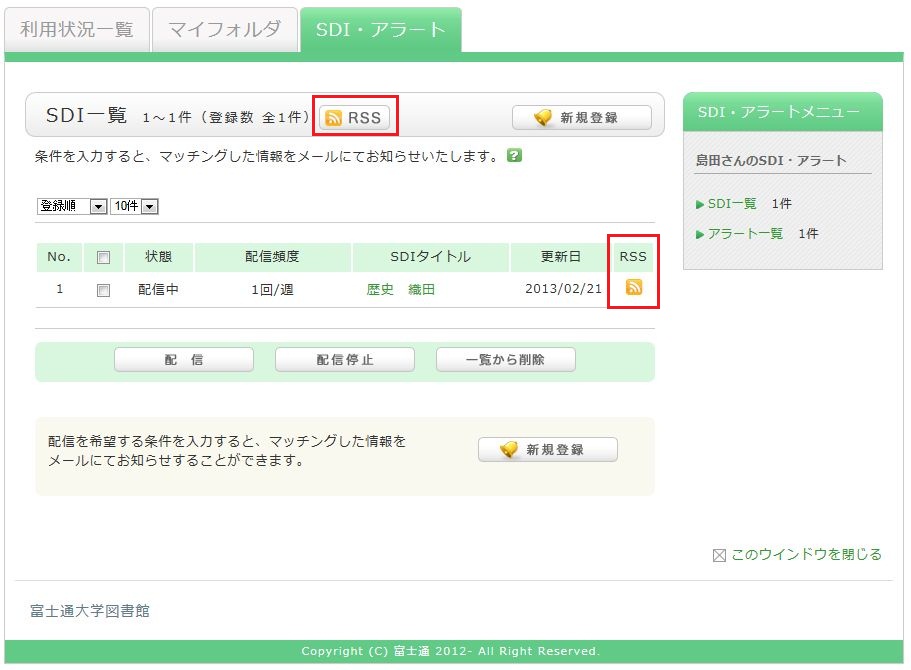
You can register for the service in an RSS reader by clicking the "RSS" button.
By registering in an RSS reader, you can check for new arrivals of the relevant materials without having to check the OPAC.