



Please tell me how to fill out the photocopy request form.
1. First, enter the information for the material you are looking for.
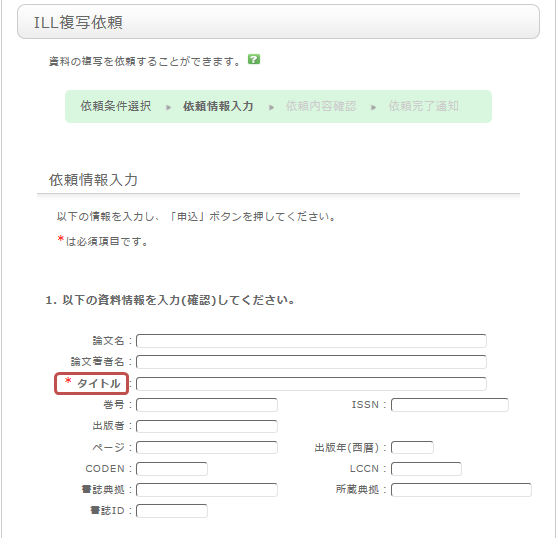
To ensure that you receive the material, please provide as much detail as possible. If you found the information in a database system, etc., please include the name of that system in the "Bibliographic Source" field.
* Please note that the screen above is for requesting a journal article. The screen will look different for books.
2. Next, enter your own information under "Applicant Information."
Please ensure that your contact information is correct, as errors may prevent us from delivering the material to you promptly. Please provide contact details where you can be reached.
3. Next, enter the request-related information, payment method, and any remarks.
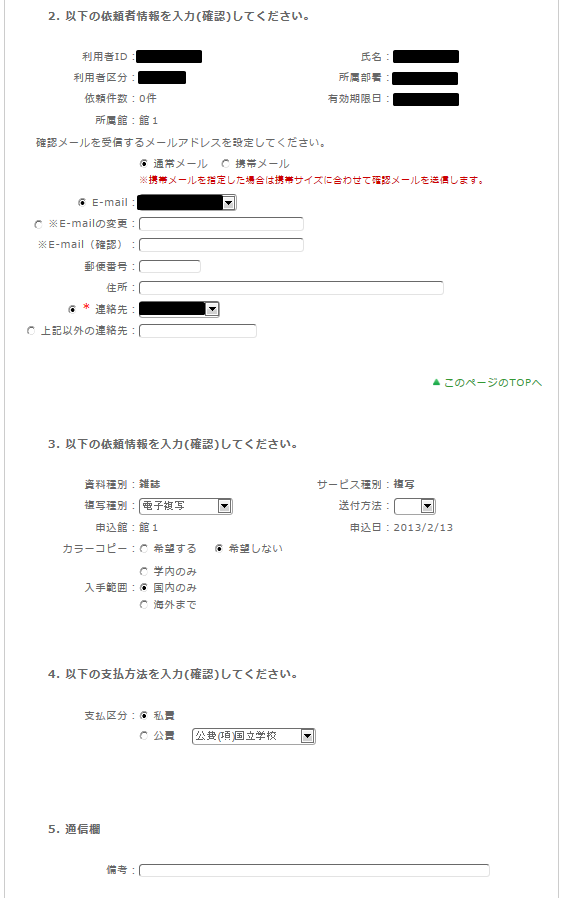
In the request-related information section, specify the photocopying method, delivery method, and the library where you wish to pick up the item. Photocopy requests are subject to a fee, so please also specify the budget limit for the request.
Please be aware that copies requested from overseas may cost more and take longer than those requested within Japan.
For the payment method, you can select "Private funds" or "Public funds." Please note that using public funds requires that you have the necessary budget available.
In the "Remarks" section, please include any additional information you need to communicate, such as specific printing instructions or individual requests regarding pick-up.
Once you have entered all the information, click the [Apply] button. After checking the details on the confirmation screen, if everything is correct, click the [Decide] button to complete your request.