



FAQ
How can I search using ISBN or ISSN numbers?
You can search by entering only the ISBN or ISSN number into the search box on the [Library Catalog] tab.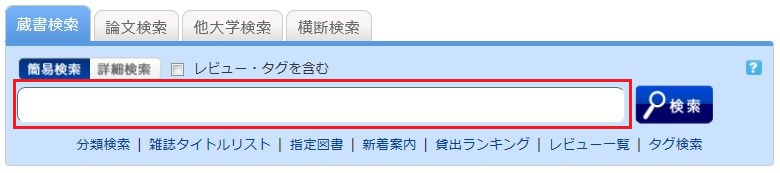
Alternatively, you can search from the advanced search screen by clicking the [Advanced Search] button on the [Library Catalog] tab.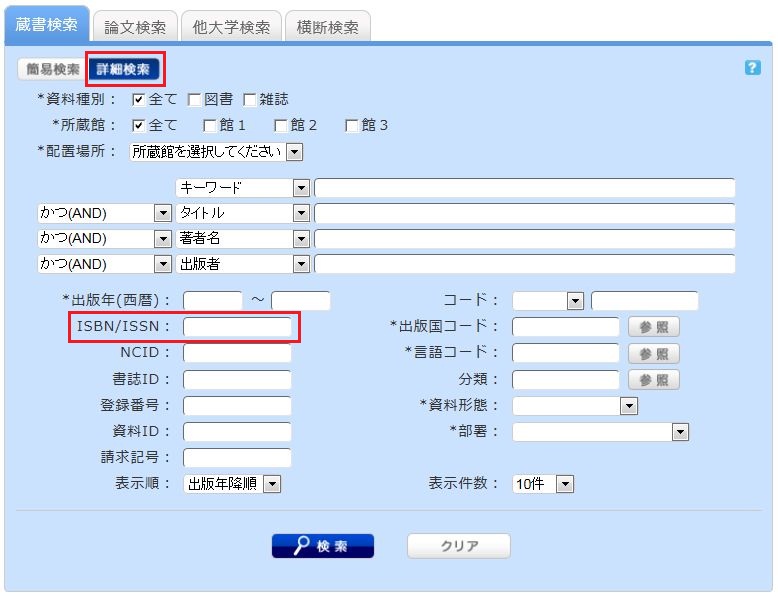
You can perform a search by entering the information in the ISBN / ISSN field.
ISBN (International Standard Book Number): A number used to identify books.
ISSN (International Standard Serial Number): A number used to identify journals/serials.
What characters can I use in the [Book Search] tab?
Available Characters
The characters that can be used on the Japanese version of the page are Kanji, Hiragana, Katakana, and alphanumeric characters. You can enter English letters in either uppercase or lowercase. You may also use either full-width or half-width characters.
Searching for Arabic, Devanagari, African, and Southeast Asian scripts
You can search using the original spelling (the script as it appears in the material), but you can also search using keywords romanized into the Latin alphabet according to the ALA-LC Romanization Tables provided by the Library of Congress. Since some materials are cataloged only with romanized Latin alphabet text, if you do not get any results with the original spelling, please romanize the terms and try searching again.
How should I search if I don't remember the exact title?
When you type a partial keyword on the [Library Catalog] tab, a list of candidate materials starting with the entered string will be displayed (Suggest feature).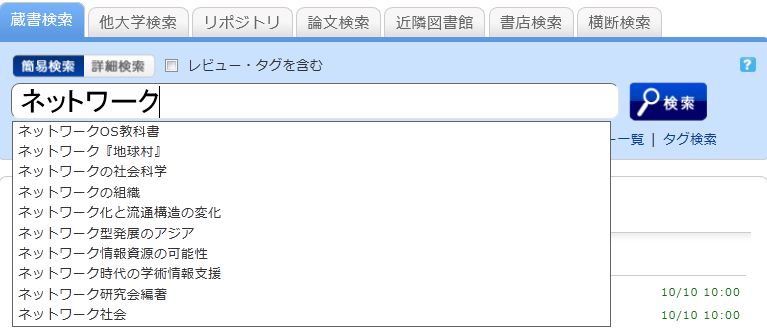
Select one from the displayed candidates and click the [Search] button to start the search.
How can I combine multiple search criteria? (e.g., searching for items containing "○○" or "△△")
You can perform the following three types of searches (logical operations) by entering multiple search terms into a single search field or by entering terms into multiple search fields.
When entering multiple search terms into a single search field (Available in both Simple Search and Advanced Search screens)
AND Search
- : Searches for materials that satisfy two or more search terms simultaneously.
- How to enter: Connect each search term with a " " (space).
- Example: To search for materials that contain both "Japan" and "America":
- "Japan America"
OR Search
- : Searches for materials that satisfy at least one of two or more search terms.
- How to enter: Connect each search term with a "+" (plus sign).
- Example: To search for materials that contain either "Japan" or "America":
- "Japan+America"
NOT Search
- : Searches for materials that satisfy a certain condition while excluding those that meet other conditions.
- How to enter: Connect each search term with a "^" (caret sign).
- Example: To search for materials that contain "Japan" but not "America":
- "Japan^America"
When entering search terms into multiple search fields (Available in the Advanced Search screen)
AND Search
- : Searches for materials that satisfy two or more search terms simultaneously.
- How to enter: Enter search terms into multiple fields and select "AND" from the pull-down menu between the fields.
- Example: To search for materials where the title contains "Japan" AND the author name contains "Tokyo":
- Title: Japan
Pull-down menu: AND - Author Name: Tokyo
NOT Search
- : Among materials that satisfy one condition, this excludes those that satisfy another condition.
- How to enter: Enter search terms into multiple fields and select "NOT" from the pull-down menu between the fields.
- Example: To search for materials where the title contains "Japan" but the author name does NOT contain "Tokyo":
- Title: Japan
Pull-down menu: NOT - Author Name: Tokyo
Primary and Secondary Search Fields
The following are called primary search fields, which can be used to perform a search independently using only their search terms.
- Keyword
- Title
- Author
- Publisher
- Subject
- Review
- Tag
- Classification
- ISBN/ISSN
- NCID
- Bibliographic ID
- Accession Number
- Material ID
- Call Number
The following are called secondary search fields, which cannot be used for a search unless combined with one or more primary search fields. On the search screen, these fields are marked with an asterisk (*) before their names.
- Material Type
- Library
- Publication Year
- Country of Publication Code
- Language Code
- Location
- Material Format
- Department
Useful symbols for [Book Search] (How can I search for items starting with "○○" or ending with "○○"?)
There are two search methods available: Keyword Search and Literal Search.
- In a Keyword Search, the system searches for materials that contain the entered search value as a word (= keyword).
In a Literal Search, the system searches for materials that contain the entered search value simply as a string of characters (= literal).
You can specify the following search methods for Literal Search:
Search Method Description Input Example Match Example Exact Match Searches for materials that exactly match the entered search string. end end END End Starts With Searches for materials that start with the entered search string. end* ending Contains Searches for materials that contain the entered search string. end weekends Ends With Searches for materials that end with the entered search string. *end weekend
- The following search fields are usually searched using Keyword Search. To perform a Literal Search in the keyword search fields listed below, please add a "#" at the beginning of your search value.
Keyword Search Fields- Title
- Author
- Publisher
- Subject
- Keyword
- The following search fields are usually searched using Literal Search.
Literal Search Fields- Publication Year
- Classification
- ISBN/ISSN
- Country of Publication Code
- Language Code
- NCID
- Accession Number (Starts with match only)
- Material ID (Starts with match only)
- Call Number (Starts with match only)
By using Literal Search, you can set search conditions in detail as follows:
Search Method Input Example
(Field: Search Value)Match Example Search for materials where the title contains the keyword "Nihon" (Keyword Search) Title: Nihon History of Nihon
Folktales of Nihon
America and NihonSearch for materials where the title is "Nihon" (Literal Search) Title: #Nihon Nihon Search for materials where the title ends with "Nihon" (Literal Search) Title: #Nihon America and Nihon
Rebirth of Nihon
NihonSearch for materials published in the 1900s (Literal Search) Publication Year: 19 1945